Visual Kanban orchestration
Four columns (Tasks, In Progress, In Review, Done) mirror how you actually ship. Drag a card to trigger execution. No shell scripts, no mental queue.
Native macOS · Apple Silicon
Lane is the visual orchestration layer for local AI coding agents. Write tasks on a Kanban board, drag to run, and let Claude Code, Codex, or OpenCode work in parallel. Each task runs in its own isolated Git worktree, streaming live to your desktop.
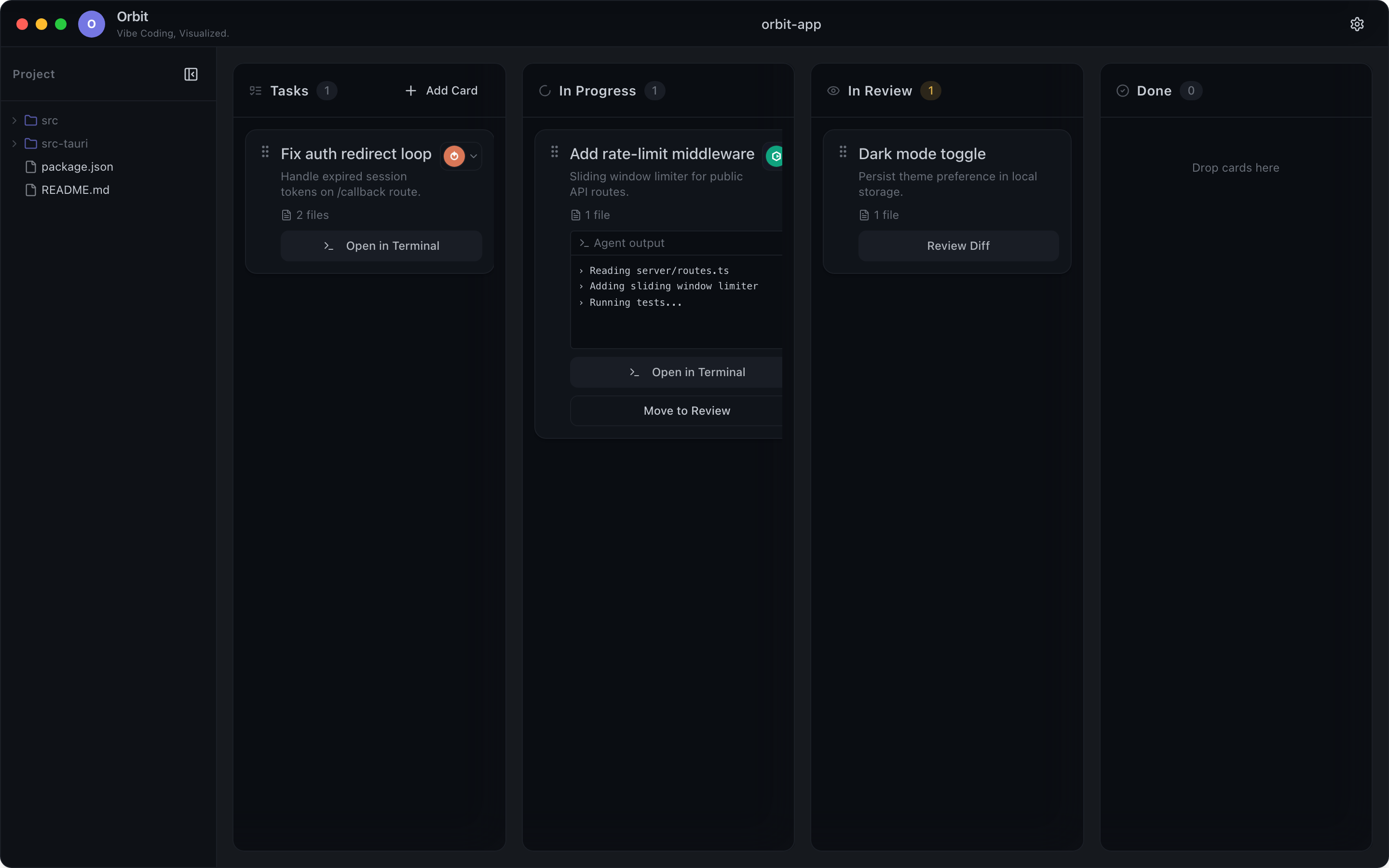
The real app. Kanban board with live agent output on every card.
Five agents · one board · all at once
Each task runs in its own isolated Git worktree. Merge only what you approve.
Title, markdown description, and context files from your project tree.
Lane spins up a Git worktree, picks your agent, and launches it headlessly.
Live terminal output streams to the card. Queue more while it runs.
Inspect the diff, merge what you trust, archive the rest.
Lane bridges the gap between high-level task planning and low-level CLI automation, without sending a single token to the cloud.
Four columns (Tasks, In Progress, In Review, Done) mirror how you actually ship. Drag a card to trigger execution. No shell scripts, no mental queue.
Every task gets its own branch and worktree. Agents can't stomp on each other. You merge only what you approve.
Watch stdout stream directly on the active card. Know what your agent is doing without alt-tabbing to a terminal.
Inspect diffs before merge. Approve and merge, or reject and send back. You stay in control of what lands in main.
Attach local file paths to any card. Your agent starts with the exact files that matter.
Lane never calls a remote API. Your code, your agents, your machine. Pay for the tools you already use, not another SaaS middleman.
Lane doesn't replace your agents. It orchestrates them. Pick a default in Settings, override per card, or bring a fully custom command template. Lane auto-detects installed CLIs on your Mac.
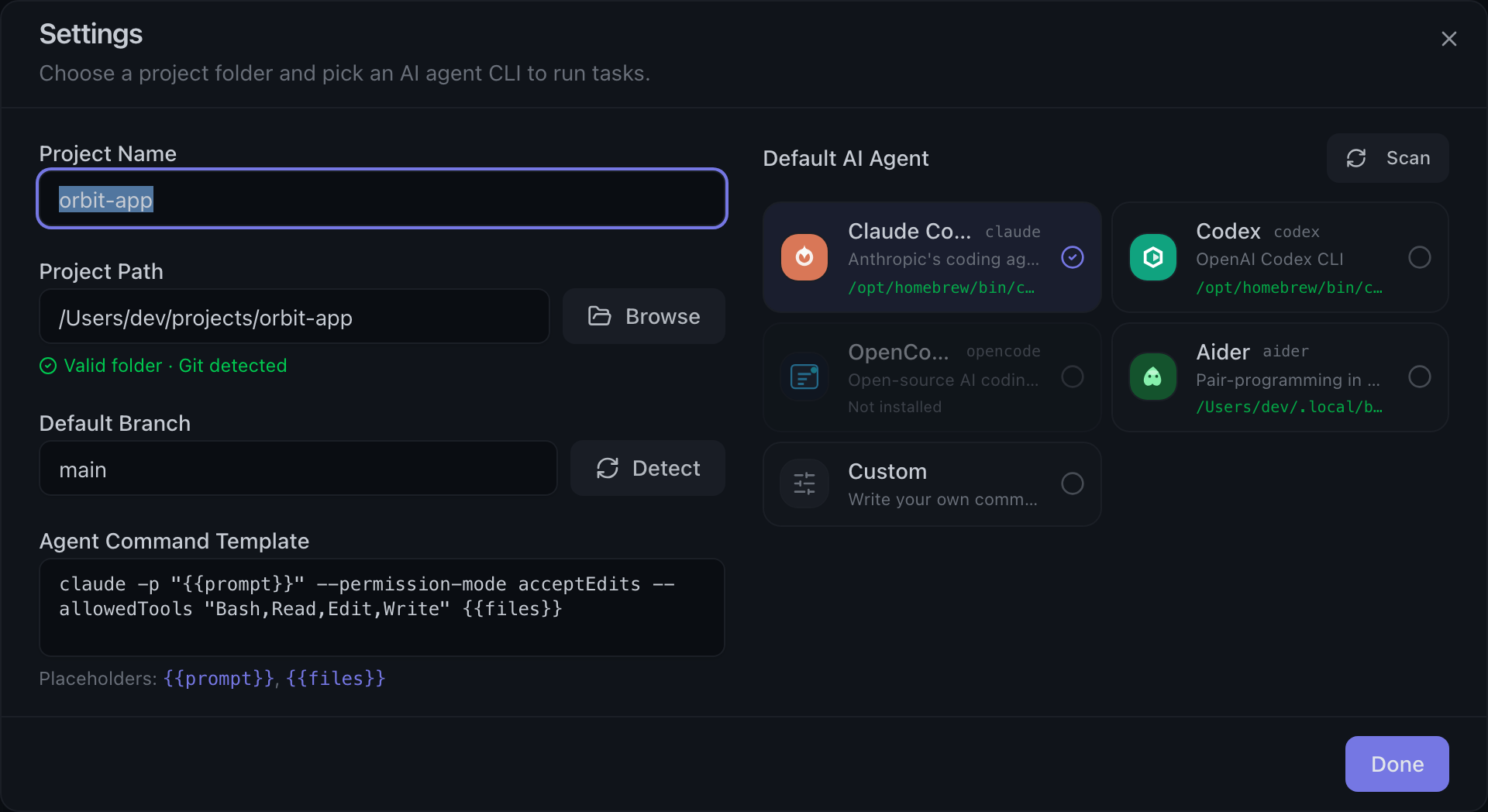
Lane is orchestration, not a middleman. It launches the agent CLIs already installed on your machine and watches their output — it never proxies your prompts, uploads your repo, or phones home with your source. The only thing that ever touches our servers is subscription billing.
Lane runs your agents locally. You keep your existing Claude Code, Codex, or OpenCode subscriptions. Our plans unlock parallelism, projects, and team workflows on top.
Free download available now · Pro & Team billing coming soon
Try the workflow
For solo developers exploring agent orchestration.
Download freeShip in parallel
For builders running multiple agents every day.
Join Pro waitlistBilling launches soon — full local orchestration is free during beta.
Need more?
Everything in Pro, plus shared boards, role-based review gates, and centralized agent presets.
Join Team waitlistSSO/SAML, audit logs, on-prem deployment, and a dedicated success manager for org-scale rollouts.
Contact us| Feature | Free | Pro | Team | Enterprise |
|---|---|---|---|---|
| Parallel agents | 1 | 5 | Unlimited | Unlimited |
| Active projects | 1 | Unlimited | Unlimited | Unlimited |
| Git worktrees | Yes | Yes | Yes | Yes |
| Live agent streaming | Yes | Yes | Yes | Yes |
| Per-card agent override | No | Yes | Yes | Yes |
| Shared team boards | No | No | Yes | Yes |
| SSO / SAML | No | No | No | Yes |
| Support | Community | Priority email | Slack + email | Dedicated |
Yes. Lane orchestrates the CLIs you already use. You bring your own agent subscriptions. We never proxy your prompts through our servers.
Upgrades take effect immediately with prorated billing. Downgrades apply at the start of your next billing cycle.
Download Lane free today with full local orchestration. Pro and Team billing (parallel limits, multi-project, shared boards) launches soon — join the waitlist from the pricing section.
Pro will include a 14-day trial when billing ships. During beta, the download is free with no account required.
Each macOS user who signs into Lane with your team workspace counts as one seat. View-only reviewers don't count toward your limit.
No. Agent execution stays on your machine. Subscription billing is the only cloud touchpoint. Your source code never leaves your Mac.
You keep access through the end of your billing period, then drop to Free limits. Your boards and settings stay on your device.
Download Lane for macOS. Point it at your repo, pick your agent, and drag your first task into motion.